Parameters Variation
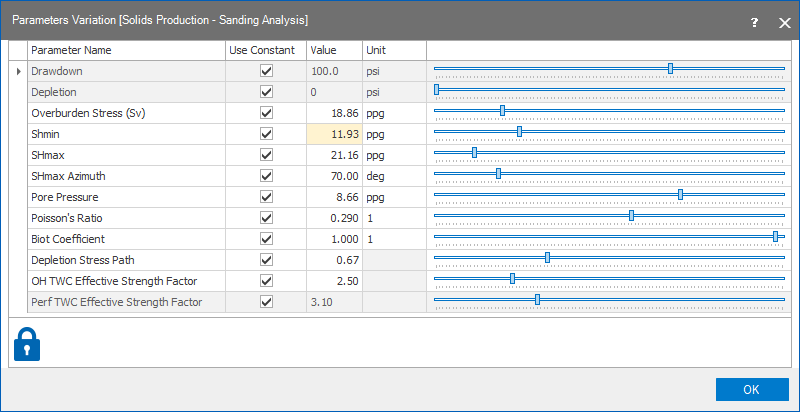
In the Parameters Variation table, you can change any input parameter involved in the Sanding Analysis workflow. The entries in the table are only editable when you select a single scenario on the Perforation Orientation form.
All the parameters that are used in the Setup and Sanding Analysis substrips in the Solids Production strip are listed in the table. The inputs that are enabled are those, where you have selected to use a constant as input. If you have selected a log as input, that parameter will be grayed out and it is not editable in the table.
Before you start making any changes, make sure to check the status of the lock in the lower left corner of the form to know what will happen to your data and calculations:
|
|
Open When the lock is green and in the open position, the associated algorithm is automatically executed when a change is made to the data’s input. Current status of output data is 'up-to-date'. |
|
|
Locked, No Changes When the lock is blue and in the locked position, the associated algorithm is not updated when a change is made to the data’s input. Current status of output data is 'up-to-date'. |
|
|
Open, Red When the lock is red and in the open position, the associated algorithm is automatically executed when a change is made to the data's input. Current status of output data is 'not-up-to-date', meaning the algorithm was already executed but output data was not calculated/updated due to some errors or lack of input data. |
|
|
Locked, Red When the lock is red and in the locked position, the associated algorithm is not updated when a change is made to the data's input. Current status of output data is 'not-up-to-date'. To apply the updates, you need to click the associated (Re)Calculation button. |


The input data in the Setup and Sanding Analysis substrips and the values in the table are synchronized. Therefore, whatever change you make in this table, it will automatically update the input data on the associated forms in the substrips.
Schematic overview showing the different depth scales click to enlarge
When you are done updating the values, click OK to close the form.